Defining Hours Worked (by Hours) Calculation Basis for PTO Benefit Plans
To define Hours Worked (by Hours) for PTO benefit plans, use the Pay Codes for Hourly Accrual and Hours Worked panels.
To define hours worked (by hours):
| 1. | Click the Client menu. |
| 2. | From Client|Change, select PTO Benefit Plans. The PTO Benefit Plans form opens |
| 3. | In Calculation Basis, select Hours Worked (by Hours). The Pay Codes for Hourly Accrual panel displays. |
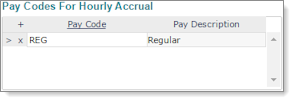
| 4. | In the Pay Codes for Hourly Accrual panel, enter each Pay Code on which to base the accrual, such as regular pay. You must specify at least one Pay Code, because if left blank, no paid time off accrues because the system cannot complete its calculations. |
| 5. | Enter the Accrual Threshold for each Pay Period used by the client in the Pay Period Accrual Thresholds panel. This limits the number of hours that employees can accrue for the specified pay period. If there is no limit on PTO accruals, you can leave this table blank.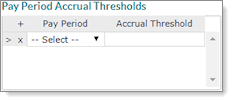 |
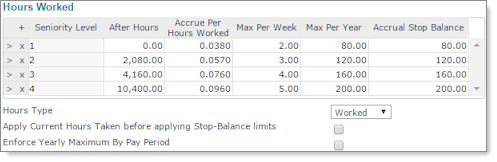
| 6. | In the Hours Worked panel, complete the following: |
|
Field |
Description |
|---|---|
|
Seniority Level |
For each seniority level:
|
|
Hours Type |
Select either Worked or Paid. If no value is set, the system assumes hours worked. |
|
Apply Current Hours Taken before applying Stop-Balance limits |
Select to subtract the hours used before applying a stop-balance limit. If you do not select this option, the system disregards the hours already used. |
|
Enforce Yearly Maximum By Pay Period |
Select to enforce the yearly maximum for this type of accrual on a pay period basis (yearly max divided by pay periods per year). If you do not select this option, the system ignores the yearly maximum. |
| 7. | Click Save. |
