 icon in
 Assigning Hours to New Pay Rate
If an employee's pay rate changes during the pay period, and there are default time sheet hours for that employee, you must resolve the issue by entering the number of hours to be paid at the new rate.
Click the red indicator  in Summary Time Sheet Entry to open the New Pay Rate Assignment form.
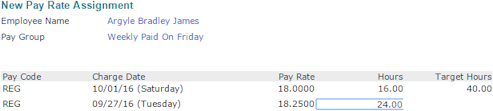
| 1. | Enter the Hours worked at the new rate (second row) and then press Tab. |
The Hours at the original rate (first row) adjust automatically so that the sum equals the Target Hours.
| 2. | Click Accept. |
The system returns you to the Summary Time Sheet Entry form, and the indicator changes to green  .
.
