 icon in
 Workers' Compensation Report
This report shows workers' compensation paid in a single payroll or date range.
Use the Workers' Compensation Report form to determine what information prints on the Workers' Compensation Report and in what order.
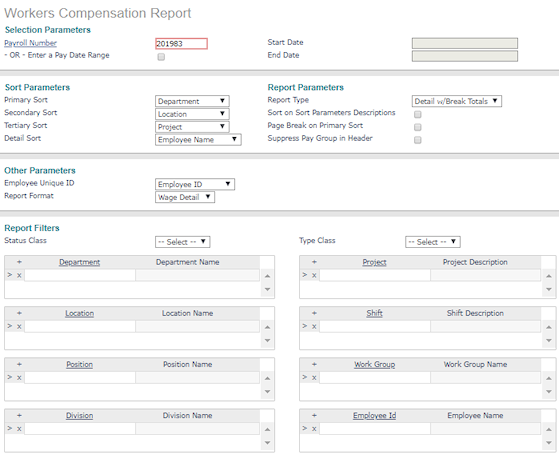
| 1. | Enter the Selection Parameters to determine what displays on the report: |
| • | Enter the Payroll Number to run this report for a specific payroll or select Enter a Pay Date Range to enter a Start Date and a End Date to run this report for a date range. |
| 2. | Set the Sort Parameters: |
| • | Select the Primary Sort for the report. |
| • | You can select a Secondary Sort and Tertiary Sort. |
| • | Select the Detail Sort: |
| • | Employee Name: This is the default option. If used as the Detail Sort, the report sorts details by employee. |
| • | State: The report sorts details by the employee's state. |
| • | W/C Code: The report sorts details by the worker's compensation code. |
| • | State, W/C Code: The report sorts details first by the employee's state, then by worker's compensation code. |
| 3. | Set the Report Parameters: |
| • | Select the Report Type: |
| • | Detail w/Break Totals: Includes a break and a sub-total for each of the sort options entered (except employee name), as well as a grand total for all employees. |
| • | Detail Only: Includes the detail information without sub-totals, only a grand total for all employees. |
| • | Summary Only: Does not include details, but only sub-totals for each of the sort options entered (except employee name) as well as a grand total for all employees. |
| • | Select Sort on Sort Parameters Descriptions to sort the report by the descriptions instead of the codes selected as the Sort Parameters. |
| • | Select Page Break on Primary Sort to start a new page for the selected Primary Sort items. |
| • | Select Suppress Pay Group in Header to exclude pay group information from the report header. |
| 4. | Set the Other Parameters: |
| • | Select the Employee Unique ID to use in the report (Employee ID, Employee Number). |
| • | Select the Report Format to use in the report (Wage Detail, Billing Detail). |
| 5. | Enter the Report Filters to display on the report: |
| • | Enter the field type. The field label displays. For example, if you enter a Location, the Location Name displays. The report displays records for that Location. |
| 6. | Click Save. The system generates the Workers' Compensation Report using these settings and the Report Format selected. |
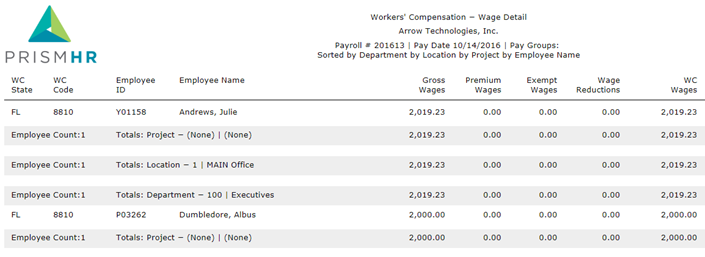
The report columns are:
| • | WC State: The employee's state. |
| • | WC Code: The job code associate with the employee’s position. |
| • | Employee ID: The employee's ID. |
| • | Employee Name: The employee's name. |
| • | Premium Wages: The premium paid to the employee. Note the following about how the premium amount is assigned: |
| • | The Suppress Shelter setting is controlled by the Suppress Shelter For Billing field on the System|Change|W/C Policies form. |
| • | The W/C Limit Overtime setting is controlled by the Workers Comp Overtime field on the System|Change|Billing Templates form. |
| • | This report uses the settings listed above to assign the premium wage amount as follows: |
| Suppress Shelter Setting | W/C Limit Overtime Setting | Report Premium Amount Result |
|---|---|---|
| Setting is enabled | Setting is enabled | Payroll vouchers amount |
| Setting is disabled | Setting is disabled | Zero |
| Setting is enabled | Setting is disabled | Zero |
| Setting is disabled | Setting is enabled | Payroll vouchers amount |
| • | Gross Wages: The gross wages for the payroll or date range specified. |
| • | Exempt Wages: The employee's wages that are exempt from workers' compensation. |
| • | Wage Reductions: The difference between the employee's gross wages and the W/C taxable earnings for the payroll or date range specified. |
| • | WC Wages: The employee's workers' compensation wages. |
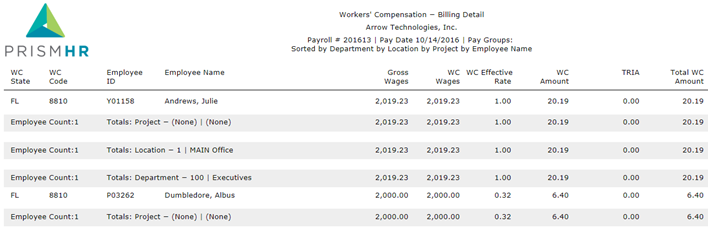
The report columns are:
| • | WC State: The employee's state. |
| • | WC Code: The job code associate with the employee’s position. |
| • | Employee ID: The employee's ID. |
| • | Employee Name: The employee's name. |
| • | Gross Wages: The gross wages for the payroll or date range specified. |
| • | WC Wages: The wages paid to the employee. |
| • | WC Effective Rate: The rate used to calculate the employee's workers' compensation. |
| • | WC Amount: The workers' compensation wages paid to the employee. |
| • | TRIA: Compensation that is covered by the Terrorism Risk Insurance Act (TRIA), if applicable. |
| • | Total WC Amount: The total workers' compensation wages paid to the employee. |
